mirror of
https://github.com/riegera2412/UVtools.git
synced 2026-07-08 17:42:31 +02:00
 Tiago Conceição
c3c952bd26
Tiago Conceição
c3c952bd26
- **Benchmark tool:**
  - (Add) Reference machine Intel® Core™ i9-13900K @ 5.5 GHz
  - (Improvement) Layout and arrangement
- **Windows MSI:**
  - (Improvement) Move registry keys from HKCU to HKLM
  - (Improvement) Sign MSI package
  - (Upgrade) Windows MSI: Wix 3 to 4
- (Fix) SL1: Change `SupportPillarWideningFactor` from ushort to float
- (Fix) PCB exposure: Implement G02 and G03 arcs (#692)
- (Upgrade) .NET from 6.0.15 to 6.0.16
- (Upgrade) openCV from 4.6.0 to 4.7.0
382 lines
17 KiB
Markdown
382 lines
17 KiB
Markdown
# UVtools
|
||
|
||
[](https://github.com/sn4k3/UVtools/blob/master/LICENSE)
|
||
[](#)
|
||
[](#)
|
||
[](#)
|
||
[](https://www.nuget.org/packages/UVtools.Core)
|
||
[](https://github.com/sn4k3/UVtools/releases)
|
||
[](https://github.com/sn4k3/UVtools/releases)
|
||
[](https://community.chocolatey.org/packages/uvtools)
|
||
[](https://github.com/sponsors/sn4k3)
|
||
|
||
## Download the latest version at:
|
||
|
||
### https://github.com/sn4k3/UVtools/releases/latest
|
||
|
||
## To auto install on Windows (package manager):
|
||
|
||
- **Winget:** `winget install -e --id PTRTECH.UVtools`
|
||
- **Chocolatey:** `choco install -y uvtools`
|
||
|
||
**Note:** Winget is included on Windows 10 with recent updates and Windows 11 by default.
|
||
|
||
## To auto install on Linux:
|
||
|
||
```bash
|
||
[ "$(command -v apt)" -a -z "$(command -v curl)" ] && sudo apt-get install -y curl
|
||
[ "$(command -v dnf)" -a -z "$(command -v curl)" ] && sudo dnf install -y curl
|
||
[ "$(command -v pacman)" -a -z "$(command -v curl)" ] && sudo pacman -S curl
|
||
[ "$(command -v zypper)" -a -z "$(command -v curl)" ] && sudo zypper install -y curl
|
||
bash -c "$(curl -fsSL https://raw.githubusercontent.com/sn4k3/UVtools/master/Scripts/install-uvtools.sh)"
|
||
```
|
||
|
||
## To auto install on MacOS:
|
||
|
||
```bash
|
||
bash -c "$(curl -fsSL https://raw.githubusercontent.com/sn4k3/UVtools/master/Scripts/install-uvtools.sh)"
|
||
```
|
||
|
||
# MSLA/DLP, file analysis, calibration, repair, conversion and manipulation
|
||
|
||
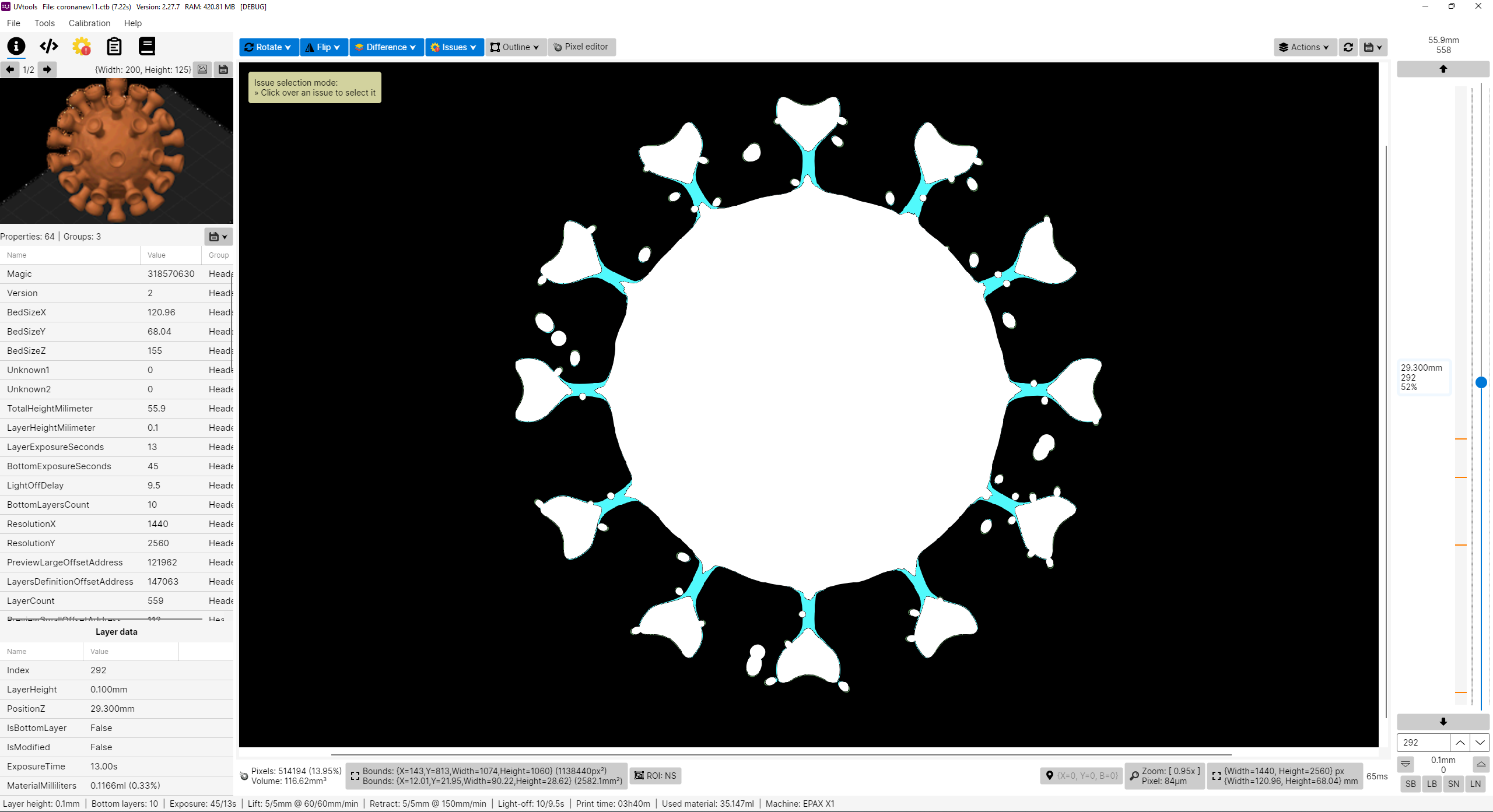
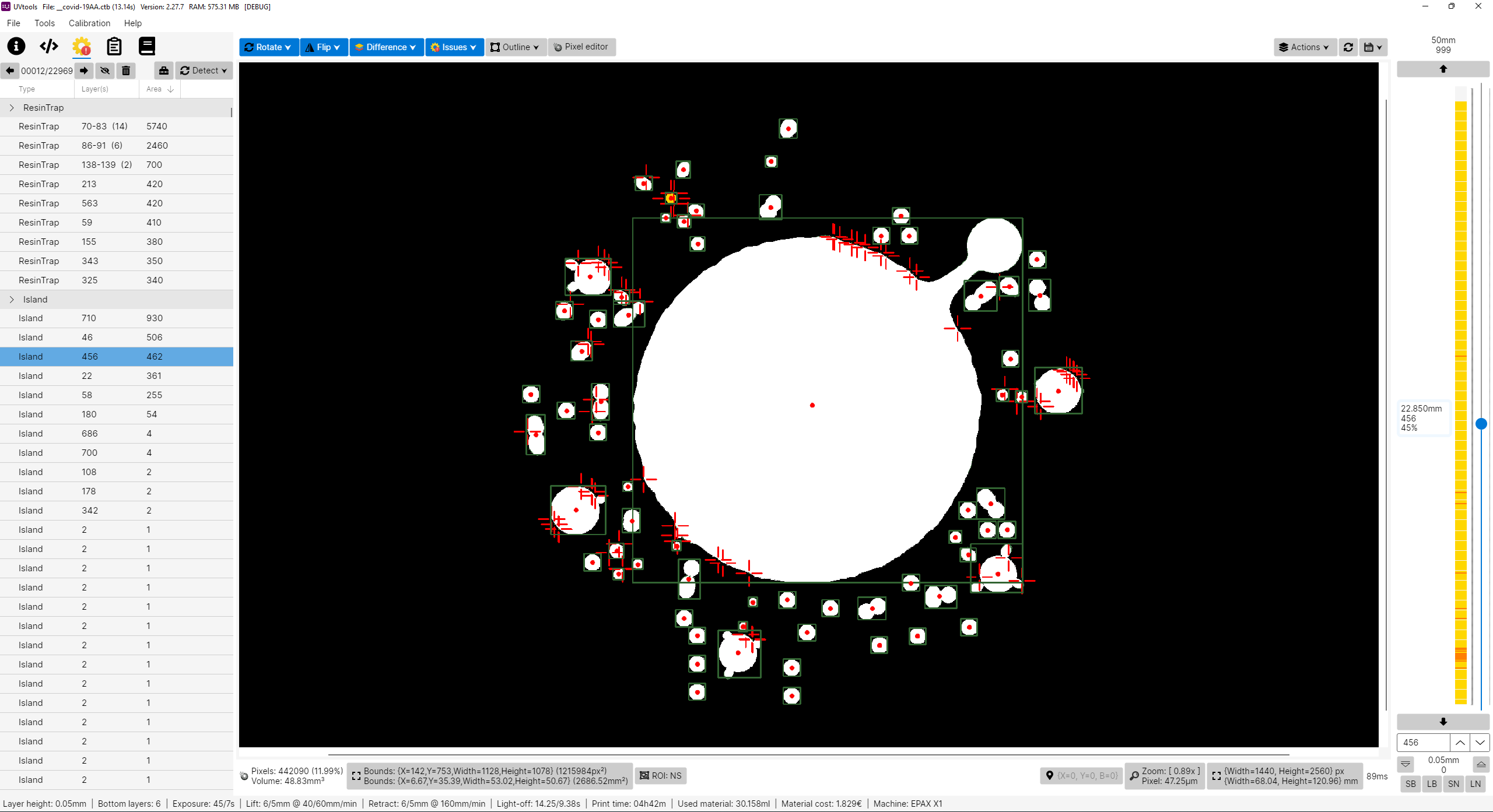
This simple tool can give you insight of supports and find key failures.
|
||
Did you forget what resin or other settings you used on a project?
|
||
This can also save you, check every setting that were used with or simply change them!
|
||
|
||
- Facebook group: https://www.facebook.com/groups/uvtools
|
||
- Discussions: https://github.com/sn4k3/UVtools/discussions
|
||
|
||
|
||
|
||

|
||
|
||
# Why this project?
|
||
|
||
I don't own a Prusa SL1 or any other resin printer, for now I’m only a FDM user with Prusa MK3 and a Ender3.
|
||
PrusaSlicer is my only choose, why? Because I think it's the best and feature more, at least for me, simple but powerful.
|
||
|
||
So why this project? Well in fact I’m looking for a resin printer and i like to study
|
||
and learn first before buy, get good and don't regret, and while inspecting i found that
|
||
resin printers firmwares are not as universal as FDM, too many file formats and there
|
||
before each printer can use their own property file, this of course limit the software selection,
|
||
for example, only PrusaSlicer can slice SL1 files. So with that in mind I'm preparing when I get
|
||
a resin printer in future I can use PrusaSlicer instead of others.
|
||
I've explored the other slicers and again, no one give me joy, and i feel them unstable,
|
||
many users slice model on PrusaSlicer just to get those supports and export STL to load in another,
|
||
that means again PrusaSlicer is on the win side, the problem is they can't slice directly on PrusaSlicer,
|
||
so, in the end, my project aims to do almost that, configure a printer on PrusaSlicer, eg: EPAX X1,
|
||
slice, export file, convert SL1 to native printer file and print.
|
||
|
||
Please note I don't own any resin printer! All my work is virtual and calculated,
|
||
so, use experimental functions with care! Once things got confirmed a list will show.
|
||
But also, I need victims for test subject. Proceed at your own risk!
|
||
|
||
# Features
|
||
|
||
- View, modify and extract layer by layer
|
||
- View, modify and extract thumbnails
|
||
- Export file to a folder
|
||
- View and edit all used properties/settings
|
||
- Many tools to mutate and filter layers
|
||
- Check for issues and repair/remove them as possible:
|
||
- Islands
|
||
- Overhangs
|
||
- Resin traps
|
||
- Suction cups
|
||
- Touching bounds
|
||
- Print height
|
||
- Empty layers
|
||
- Suggestions and auto corrections:
|
||
- Layer height
|
||
- Bottom layer count
|
||
- Wait time before cure
|
||
- Wait time after cure
|
||
- Transition layer count
|
||
- Model position
|
||
- [Convert format to another format](https://github.com/sn4k3/UVtools/wiki/Sliced-File-Conversion)
|
||
- Calibration tests
|
||
- Portable (No installation needed)
|
||
|
||
# Known File Formats
|
||
|
||
- SL1 (PrusaSlicer)
|
||
- SL1S (PrusaSlicer)
|
||
- Zip (Chitubox)
|
||
- Photon (Chitubox)
|
||
- Photons (Chitubox)
|
||
- CBDDLP (Chitubox)
|
||
- CTB (Chitubox)
|
||
- PHZ (Chitubox)
|
||
- FDG (Voxelab)
|
||
- PWS (Photon Workshop)
|
||
- PW0 (Photon Workshop)
|
||
- PWX (Photon Workshop)
|
||
- DLP (Photon Workshop)
|
||
- DL2P (Photon Workshop)
|
||
- PWMO (Photon Workshop)
|
||
- PWMA (Photon Workshop)
|
||
- PWMS (Photon Workshop)
|
||
- PWMX (Photon Workshop)
|
||
- PMX2 (Photon Workshop)
|
||
- PWMB (Photon Workshop)
|
||
- PWSQ (Photon Workshop)
|
||
- PM3 (Photon Workshop)
|
||
- PM3M (Photon Workshop)
|
||
- PM3R (Photon Workshop)
|
||
- PWC (Photon Workshop)
|
||
- JXS (GKone Slicer)
|
||
- ZCode (UnizMaker)
|
||
- ZCodex (Z-Suite)
|
||
- CWS (NovaMaker)
|
||
- RGB.CWS (Nova Bene4 Mono / Elfin2 Mono SE)
|
||
- XML.CWS (Wanhao Workshop)
|
||
- MDLP (Makerbase MKS-DLP v1)
|
||
- GR1 (GR1 Workshop)
|
||
- CXDLP (Creality Box)
|
||
- GOO (Elegoo)
|
||
- LGS (Longer Orange 10)
|
||
- LGS30 (Longer Orange 30)
|
||
- LGS120 (Longer Orange 120)
|
||
- LGS4K (Longer Orange 4K & mono)
|
||
- Flashforge SVGX
|
||
- Anet N4
|
||
- Anet N7
|
||
- ZIP (Generic / Phrozen Zip)
|
||
- VDA.ZIP (Voxeldance Additive)
|
||
- VDT (Voxeldance Tango)
|
||
- OSF (Vlare Open File Format)
|
||
- UVJ (Zip file format for manual manipulation)
|
||
- Image files (png, jpg, jpeg, jp2, tif, bmp, pbm, pgm, ras, sr)
|
||
|
||
# PrusaSlicer
|
||
|
||
- **Installation:** https://github.com/sn4k3/UVtools/wiki/Setup-PrusaSlicer
|
||
- **Available printers:** https://github.com/sn4k3/UVtools/tree/master/PrusaSlicer/printer
|
||
- **Available profiles**:
|
||
- From 0.01mm to 0.20mm
|
||
- Light, Medium and Heavy Supports
|
||
- **Custom "Material Notes" and "Printer Notes" keywords:**
|
||
- **TransitionLayerCount_xxx:** Sets the number of transition layers
|
||
- **BottomLightOffDelay_xxx:** Sets the bottom light off delay time in seconds
|
||
- **LightOffDelay_xxx:** Sets the light off delay time in seconds
|
||
- **BottomWaitTimeBeforeCure_xxx:** Sets the bottom wait time before cure in seconds
|
||
- **WaitTimeBeforeCure_xxx:** Sets the wait time before cure in seconds
|
||
- **BottomWaitTimeAfterCure_xxx:** Sets the bottom wait time after cure in seconds
|
||
- **WaitTimeAfterCure_xxx:** Sets the wait time after cure in seconds
|
||
- **BottomLiftHeight_xxx:** Sets the bottom lift height in millimeters
|
||
- **BottomLiftSpeed_xxx:** Sets the bottom lift speed in millimeters/minute
|
||
- **LiftHeight_xxx:** Sets the lift height in millimeters
|
||
- **LiftSpeed_xxx:** Sets the lift speed in millimeters/minute
|
||
- **BottomWaitTimeAfterLift_xxx:** Sets the bottom wait time after lift in seconds
|
||
- **WaitTimeAfterLift_xxx:** Sets the wait time after lift in seconds
|
||
- **RetractSpeed_xxx:** Sets the retract speed in millimeters/minute
|
||
- **BottomLightPWM_xxx:** Sets the bottom LED light power (0-255)
|
||
- **LightPWM_xxx:** Sets the LED light power (0-255)
|
||
- **FILEVERSION_n:** Sets the output file format version/revision
|
||
- **FILEFORMAT_xxx:** Sets the output file format extension to be auto converted once open on UVtools
|
||
|
||
Note that some variables will only work if the target format supports them, otherwise they will be ignored.
|
||
Replace the "xxx" by your desired value in the correct units
|
||
|
||
# Command-line
|
||
|
||
## UVtoolsCmd (Console) executable
|
||
|
||
```bash
|
||
Usage:
|
||
UVtoolsCmd [command] [options]
|
||
|
||
Options:
|
||
-q, --quiet Make output silent but exceptions error will still show
|
||
--no-progress Show no progress
|
||
--core-version Show core version information
|
||
--version Show version information
|
||
-?, -h, --help Show help and usage information
|
||
|
||
Commands:
|
||
set-properties <input-file> <property=value> Set properties in a file or to it layers with new values
|
||
run <input-file> <files> Run operations and/or scripts
|
||
convert <input-file> <target-type/ext> <output-file> Convert input file into a output file format by a known type or extension []
|
||
extract <input-file> <output-folder> Extract file contents to a folder []
|
||
copy-parameters <input-file> <target-files> Copy print parameters from one file to another
|
||
set-preview, set-thumbnail <input-file> <file path|layer Sets and replace thumbnail(s) in the file [default: :heatmap]
|
||
index|:random-layer|:heatmap>
|
||
print-issues <input-file> Detect and print issues
|
||
print-properties <input-file> Prints available properties
|
||
print-gcode <input-file> Prints the gcode of the file if available
|
||
print-machines Prints machine settings
|
||
```
|
||
|
||
Note: On each command you can use -? to see specific command help and extra options
|
||
|
||
## UVtools (UI) executable
|
||
|
||
- **Open file(s):**
|
||
- **Syntax:** UVtools \<file1\> [file2] [file3] ...
|
||
- **Example 1:** UVtools C:\model.osla
|
||
- **Example 2:** UVtools C:\model.zip D:\other_model.osla
|
||
- **Note:** When a invalid file is pass, the program will open as default.
|
||
- **Redirect a command to UVtoolsCmd:**
|
||
- **Syntax:** UVtools --cmd \<commands ...\>
|
||
- **Example 1:** UVtools --cmd convert C:\model.osla zip
|
||
- **Note:** This can be used when UVtoolsCmd is not directly exposed, for example if you are running via a .AppImage.
|
||
All commands will be redirected to `UVtoolsCmd` and the UI will not run. It still shows the terminal window.
|
||
|
||
### Legacy
|
||
|
||
The following commands are the old way and commands under the UI executable, they will be removed in near future, try to not use them, please prefer **UVtoolsCmd**.
|
||
|
||
- **Convert a file into another type(s)**
|
||
- **Syntax:** UVtools -c/--convert \<input_file\> \<output_file1_or_ext\> [output_file2_or_ext] ...
|
||
- **Example 1:** UVtools -c model.zip osla
|
||
- **Example 2:** UVtools -c model.zip model_converted.osla
|
||
- **Example 3:** UVtools --convert model.zip model_converted.osla model_converted.zcode
|
||
- **Note:** Nothing happen when providing wrong files, will quit.
|
||
- **Extract a file to a folder**
|
||
- **Syntax:** UVtools -e/--extract \<input_file\> [output_folder]
|
||
- **Example 1:** UVtools -e model.zip
|
||
- **Example 2:** UVtools -e model.zip mymodel
|
||
- **Example 3:** UVtools --extract model.zip .
|
||
- **Note:** Nothing happen when providing wrong files/folder, will quit.
|
||
- **Export a file to a 3D mesh**
|
||
- **Syntax:** UVtools --export-mesh \<input_file\> [output_mesh_file]
|
||
- **Example 1:** UVtools --export-mesh model.zip
|
||
- **Example 2:** UVtools --export-mesh model.zip model_exported.stl
|
||
- **Note:** Nothing happen when providing wrong files, will quit.
|
||
- **Run a operation and save the file**
|
||
- **Syntax:** UVtools --run-operation \<input_file\> \<operation_file.uvtop\>
|
||
- **Example 1:** UVtools --run-operation model.zip MyMorph.uvtop
|
||
- **Note:** Nothing happen when providing wrong files, will quit.
|
||
- **Run a script and save the file**
|
||
- **Syntax:** UVtools --run-script \<input_file\> \<script_file.cs\>
|
||
- **Example 1:** UVtools --run-script model.zip myScript.cs
|
||
- **Note:** Nothing happen when providing wrong files, will quit.
|
||
- **Copy print parameters from one file to another**
|
||
- **Syntax:** UVtools --copy-parameters \<from_file\> \<to_file\>
|
||
- **Example 1:** UVtools --copy-parameters model.zip otherfile.zip
|
||
- **Note:** Nothing happen when providing wrong files, will quit.
|
||
|
||
# Requirements
|
||
|
||
## Windows
|
||
|
||
1. Windows 7 SP1 or greater
|
||
1. If on Windows 10/11 N or NK:
|
||
- [Media Feature Pack](https://www.microsoft.com/download/details.aspx?id=48231) must be installed
|
||
- Press Windows + R
|
||
- Type: appwiz.cpl (and press Enter key)
|
||
- Click on: Turn Windows features on or off
|
||
- Check the "Media Extensions" and click Ok
|
||
<!-- 1. [.NET 6.0](https://dotnet.microsoft.com/download/dotnet/6.0) installed (Comes pre-installed on Windows 10 with last updates)!-->
|
||
1. 4GB RAM or higher
|
||
2. 64 bit System
|
||
3. 1920 x 1080 @ 100% scale as minimum resolution
|
||
|
||
## Linux
|
||
|
||
1. 4GB RAM or higher
|
||
2. 64 bit System
|
||
3. 1920 x 1080 @ 100% scale as minimum resolution
|
||
|
||
### Installing the dependencies
|
||
|
||
**Copy the following script, paste and run on a terminal:**
|
||
(Required if you didn't use the [auto installer](https://github.com/sn4k3/UVtools#to-auto-install-on-linux) or if it failed to detect and install dependencies)
|
||
|
||
```bash
|
||
[ "$(command -v apt-get)" -a -z "$(command -v curl)" ] && sudo apt-get install -y curl
|
||
[ "$(command -v pacman)" -a -z "$(command -v curl)" ] && sudo pacman -S curl
|
||
[ "$(command -v dnf)" -a -z "$(command -v curl)" ] && sudo dnf install -y curl
|
||
[ "$(command -v zypper)" -a -z "$(command -v curl)" ] && sudo zypper install -y curl
|
||
sudo bash -c "$(curl -fsSL https://raw.githubusercontent.com/sn4k3/UVtools/master/Scripts/install-dependencies.sh)"
|
||
```
|
||
<!-- sudo bash -c "$(curl -fsSL https://raw.githubusercontent.com/sn4k3/UVtools/master/Scripts/libdl-solver.sh)" !-->
|
||
|
||
**To run UVtools open it folder on a terminal and call one of:**
|
||
|
||
- Double-click `UVtools` file
|
||
- `./UVtools`
|
||
- `bash UVtools.sh`
|
||
- `dotnet UVtools.dll` [For universal package only, requires dotnet-runtime]
|
||
- As a practical alternative you can create a shortcut on Desktop
|
||
|
||
If you downloaded the **.AppImage** package variant you must set run permissions to it before attempt to run it:
|
||

|
||
|
||
## Mac
|
||
|
||
1. macOS 10.15 Catalina or higher
|
||
1. 4GB RAM or higher
|
||
3. **For Mac M1/M2 (ARM):**
|
||
1. Install via the [auto installer](https://github.com/sn4k3/UVtools#to-auto-install-on-macos-homebrew)
|
||
|
||
To run UVtools open it folder on a terminal and call one of:
|
||
|
||
- Double-click `UVtools` file
|
||
- `./UVtools.app/Contents/MacOS/UVtools`
|
||
- `bash UVtools.app/Contents/MacOS/UVtools.sh`
|
||
- As a practical alternative you can create a shortcut on Desktop
|
||
|
||
# How to use
|
||
|
||
There are multiple ways to open your file in UVtools:
|
||
|
||
1. Open UVtools and load your file (CTRL + O) (File -> Open)
|
||
2. Open UVtools and drag and drop your file inside window
|
||
3. Drag and drop file into UVtools.exe
|
||
4. Set UVtools the default program to open your files
|
||
|
||
# Library -> Developers
|
||
|
||
Are you a developer?
|
||
This project include a .NET 6.0 library (UVtools.Core) that can be referenced in your application to make use of my work.
|
||
Easy to use calls that allow you work with the formats. For more information navigate main code to see some calls.
|
||
|
||
Nuget package: https://www.nuget.org/packages/UVtools.Core
|
||
|
||
[](https://www.nuget.org/packages/UVtools.Core)
|
||
|
||
```powershell
|
||
dotnet add package UVtools.Core
|
||
```
|
||
|
||
## Scripting:
|
||
|
||
- [Powershell](https://github.com/sn4k3/UVtools/tree/master/Scripts/UVtools.Powershell)
|
||
- [Python](https://github.com/sn4k3/UVtools/tree/master/Scripts/UVtools.Python)
|
||
|
||
## Develop and build from Source
|
||
|
||
[Build directions](https://github.com/sn4k3/UVtools/tree/master/build)
|
||
The fastest way to compile the project is by run the `build/compile.bat`, however if you wish to develop with visual studio follow the following steps:
|
||
|
||
1. Install Visual Studio and include .NET development support
|
||
1. Install the [.NET 6.0 SDK](https://dotnet.microsoft.com/download/dotnet/6.0) if not included on previous installation
|
||
1. Install the [Avalonia for Visual Studio](https://marketplace.visualstudio.com/items?itemName=AvaloniaTeam.AvaloniaVS):
|
||
1. Install the Wix Toolset: (Required only for MSI build, **optional**)
|
||
- `dotnet tool install --global wix --version 4.0.0`
|
||
- [Visual Studio HeatWave extension](https://www.firegiant.com/wix/heatwave)
|
||
1. Open UVtools.sln
|
||
1. Build
|
||
|
||
|
||
# TODO
|
||
- More file formats
|
||
- Clean up & performance (always)
|
||
- See features request under GitHub
|
||
|
||
|
||
# Support my work / Donate
|
||
|
||
All my work here is given for free (OpenSource), it took some hours to build, test and polish the program.
|
||
If you're happy to contribute for a better program and for my work i will appreciate the tip.
|
||
Use one of the following methods:
|
||
|
||
[](https://github.com/sponsors/sn4k3)
|
||
[](https://paypal.me/SkillTournament)
|
||
|
||
# Contributors
|
||
|
||
[](https://github.com/sn4k3/UVtools/graphs/contributors)
|
||
[](https://github.com/sn4k3/UVtools/graphs/contributors)
|